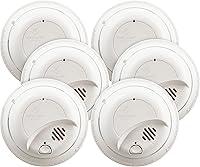
Why Does My Smoke Detector Keep Beeping?
If your smoke detector keeps beeping, check for smoke first, then identify the alarm and follow its manual. A brief chirp can point to a battery, fault, or end-of-life warning; a continuous alarm needs immediate attention.
On this page (9 sections)
- Why does my smoke detector keep beeping?
- What should you do first if it keeps chirping?
- Could a low or incorrectly installed battery cause the beeping?
- Can dust or insects make a smoke alarm beep?
- Why does a detector keep beeping after a battery change?
- Could a hardwired alarm chirp because of its backup battery or wiring?
- Does the alarm's age matter?
- How do you stop a smoke detector from beeping safely?
- Which smoke detector should you choose if yours keeps beeping?
If your smoke detector keeps beeping, first check for smoke or fire, then identify which alarm is making the sound. A brief chirp may call for a battery change, cleaning, reset, or replacement; a continuous alarm can signal danger.
If there is smoke, fire, or a continuous alarm, leave the building and call emergency services from outside. Don't troubleshoot an active warning while you remain inside.
Why does my smoke detector keep beeping?
An occasional chirp may signal a low battery, fault, or end-of-life warning. A continuous alarm can signal smoke, so check for danger first and follow the alarm's manual.
Listen to the pattern and note which alarm is making the sound. In an interconnected system, one alarm may trigger others, so check each unit's status light and instructions.
A quick way to narrow it down:
- One short chirp at intervals: check the battery, fault indicator, and alarm age.
- Several beeps in a repeated pattern: check the model's guide for that code.
- A continuous alarm: look for smoke or fire, leave if there is any danger, and call for help from outside.
- A chirp after changing the battery: check installation and follow the reset steps.
Sound patterns differ by brand and model. For a pattern of three beeps, see what three smoke detector beeps mean.
What should you do first if it keeps chirping?
Check for smoke or fire, identify the alarm, then use its manual to interpret the chirp. Don't remove its power and leave it disabled while you figure out the cause.
Look for the alarm that is flashing or making the loudest sound. Check whether it is battery-powered or hardwired, and whether its battery can be replaced.
If several alarms are connected, the sound may spread through the system from one initiating unit. Check the lights and instructions on each alarm rather than assuming every unit has the same fault.
If an alarm shows a fault or continues chirping after the steps in its manual, contact the manufacturer. For a hardwired alarm, contact a qualified electrician if wiring or connected alarms may be involved.
Could a low or incorrectly installed battery cause the beeping?
Yes, a low battery or one that isn't seated properly may cause periodic chirping. If your alarm has a replaceable battery, fit the type specified in the manual and make sure it is installed in the correct direction.
After changing it, close the battery compartment and press the test button as instructed. Some models may need a reset; use the steps in how to reset a smoke detector.
Sealed-battery alarms don't take a replacement battery. If one chirps because the battery or alarm has reached its end of life, replace the whole unit as the manufacturer directs.
Which alarms help avoid routine battery changes?
Alarms with built-in 10-year batteries avoid routine battery replacement during their stated operating period. They still need regular checks and replacement when they reach end of life or signal a fault.
The X-Sense SD2J0AX 5-pack has a built-in battery with a stated life of up to 10 years. It works independently, without Wi-Fi or wireless interconnection.
Choose this set when multiple battery-powered alarms need replacement and you don't need connected alerts. Skip it if you want alarms to sound together or need app notifications, since this model works independently and has no Wi-Fi or app alerts.
Before buying replacements, check the alarm type your home needs, local requirements, and whether your current units are interconnected. A standalone alarm may not suit a home where you rely on linked alerts.
Can dust or insects make a smoke alarm beep?
Dust or insects can interfere with an alarm's sensing chamber and cause an alert or fault. Clean the unit only as the manufacturer directs, and don't open its case or spray liquids into it.
If the manual permits, use a vacuum attachment or soft brush around the outside vents. Avoid pressing tools through the openings, since that can damage the alarm.
After cleaning, reinstall the alarm if you removed it, then follow the manual's check procedure. If the chirp continues, the cause may be a fault or an expired unit rather than dirt.
A common mistake is to silence a nuisance alarm and forget to restore it. Silence it only as directed, then confirm the unit is back in service.
Why does a detector keep beeping after a battery change?
If it still chirps after a new battery, check that the battery is the correct type and seated firmly, then reset the alarm if its manual calls for it. A fault or end-of-life signal may require replacement.
Some alarms can retain charge briefly after power is disconnected. Reset steps may include removing the alarm from its base, disconnecting power, and using the test button, but procedures vary.
For a hardwired alarm, don't handle exposed wiring. If the manual's steps don't stop the chirp, get help from a qualified electrician or the manufacturer.
When might replacing the alarm make sense?
Replace an alarm that has reached its service life or continues to show an end-of-life warning. Check its date and replacement guidance in the manual; alarms don't all have the same service life.
The Kidde 20SD10 3-pack has a built-in 10-year battery. Its photoelectric sensing is designed to help reduce false alarms from everyday cooking or steam, and the alarm includes a red LED.
Choose it when several alarms need replacement and you want sealed-battery units with a visual indicator. Skip it if you need wireless interconnection or app alerts; this model is a battery-powered alarm, and those features aren't specified for it.
For a single replacement where a slim shape matters, the First Alert 10-Year Slim Smoke Alarm has a sealed battery and an end-of-life warning. First Alert describes its profile as half the depth of a standard alarm.
Choose it if you want a slim profile and a sealed battery. Skip it if you need a multi-alarm pack or connected alerts, and check the manufacture date and installation directions before fitting it.
Could a hardwired alarm chirp because of its backup battery or wiring?
Yes, a hardwired alarm may chirp because of its backup battery, a fault, or a power issue. Follow its manual, and leave wiring checks to a qualified electrician.
If the model has a replaceable backup battery, replace it only as directed. A power interruption or loose connection may affect the system, but don't remove the unit or touch wires unless the manufacturer specifically instructs you to do so safely.
If several interconnected alarms beep at once, use their lights and the manual to identify the initiating alarm. For a blinking red indicator, see what a red light on a smoke detector means.
When replacing a hardwired alarm, check compatibility with the existing wiring and connected units before buying. A battery-powered standalone replacement may not work as part of a wired alarm system.
See hard-wired smoke detector replacements for options to compare.
Does the alarm's age matter?
Yes, an alarm near or past its replacement date may chirp or give an end-of-life warning. Check its manufacture or installation date and use the service-life guidance for that model.
Replace an expired alarm even if it stops chirping after a reset. Read how long smoke detectors last for help checking alarm age.
First Alert's 10-Year Slim Smoke Alarm has a sealed 10-year battery and an end-of-life warning. Its slim profile may suit a spot where a deeper unit is awkward, but battery life and alarm service life are different things to check in the manual.
If your alarm is still within its service life, don't assume every chirp means it has expired. Work through the model's battery, cleaning, and reset guidance first, then replace it if the warning persists.
How do you stop a smoke detector from beeping safely?
Address the cause shown by the alarm's pattern instead of disabling the unit. Replace a removable battery, clean the vents as directed, reset the alarm if required, or replace an expired or faulty unit.
Test each alarm after maintenance and keep it powered. If it continues to chirp, shows a fault, or is hardwired and may have a connection problem, contact the manufacturer or a qualified electrician.
Common mistakes include mixing up a short chirp with a continuous alarm, fitting the wrong battery, ignoring the alarm's age, and removing power without restoring it. Check the manual after each repair step, since reset and silence controls vary by model.
Which smoke detector should you choose if yours keeps beeping?
Choose a replacement based on the cause of the beeping and the alarm system you already have. A fresh battery can solve a low-battery chirp, while an expired unit needs replacement and a hardwired fault needs the right compatible alarm or qualified help.
Pick the X-Sense SD2J0AX if you need several standalone alarms with built-in batteries and don't need app or interconnected alerts. Pick the Kidde 20SD10 if you need a 3-pack with sealed batteries and a red LED.
Pick the First Alert Slim if one sealed-battery alarm with an end-of-life warning and slim profile fits your needs.
Before ordering, count the alarms that need replacement and check whether they are hardwired, interconnected, or standalone. Confirm the battery type, model instructions, placement needs, and local requirements.
Don't replace a wired or linked system with a standalone unit unless it is compatible with your home's setup.
If you're still asking why your smoke detector keeps beeping after the correct battery, cleaning, and reset steps, check its age and fault signals. Replace an expired alarm, and get manufacturer or electrician help for a persistent fault or wiring concern.
Frequently asked questions
Why does my smoke detector beep every 30 seconds?
A brief chirp every 30 seconds may signal a low battery, a fault, or an end-of-life warning, but the pattern varies by model. Check the alarm's manual and status light, replace a removable battery if instructed, and replace the alarm if it has reached its service life.
Can dust make a smoke detector keep beeping?
Yes, dust or small insects inside an alarm can interfere with its sensing chamber and cause unwanted alerts. Follow the manufacturer's cleaning instructions, which may call for a vacuum or soft brush around the vents.
Don't open the alarm or spray cleaner into it.
Why does a hardwired smoke detector beep after a power outage?
A hardwired alarm may chirp after an outage if its backup battery is low, or it may need a reset after power returns. Check the manual for the correct battery and reset steps.
If alarms remain noisy or show a fault, contact the maker or a qualified electrician.
Should I remove the battery to stop a smoke detector from beeping?
Don't leave a smoke alarm without power just to stop a chirp. Replace the battery if the model uses a replaceable one, then reinstall it and test the alarm as directed.
Sealed-battery alarms usually need replacement when they reach end of life or signal a fault.